Questions for Beginners
1. Kubernetes Overview?
Kubernetes (k8s) is described as a container orchestration platform. It takes care of the lifecycle of a containerized application and services to provide high scalability and availability.
Let's take an example here:-
By now you must be familiar with Docker, it is an application containerization tool. It packages an application with its dependencies in a containerized environment that can be spun up within minutes. So you have your application running inside a container. This container must be having some resource requirements like CPU or Memory and also some networking rules to expose your application. What happens if your container gets terminated for some reason? By default, Docker doesn't have a fault tolerance feature for containers. This means your application won't start until you figure out why the container is dead. You need to manually start the container every time it goes down (By again troubleshooting the issue).
Imagine where you have multiple containers that have to have some resource usage (like some CPU & memory) and some networking rules to connect your containers. What will you feel if all the containers face some issues and go down? Sounds too complicated, isn't it? it could create a large downtime for your application and loss of business of course.
This is where a container orchestration platform like Kubernetes comes into the picture and manages the entire lifecycle of a container (more than one). If a container stops, Kubernetes restarts it. It also provides the networking rules for containers. It helps you reside how to handle the container if the traffic is increased to the application.
Kubernetes allows you to manage your environment, giving you better application flexibility, reliability, and stability. The main objective here is to have near-zero downtime for our applications
* So now you have an idea about the purpose Kubernetes fulfill.
2. What is Kubernetes?
Kubernetes is an open-source project that helps to manage our container lifecycle. It helps in automating the deployment, management, and scaling of applications.
3. What is the Architecture of Kubernetes?
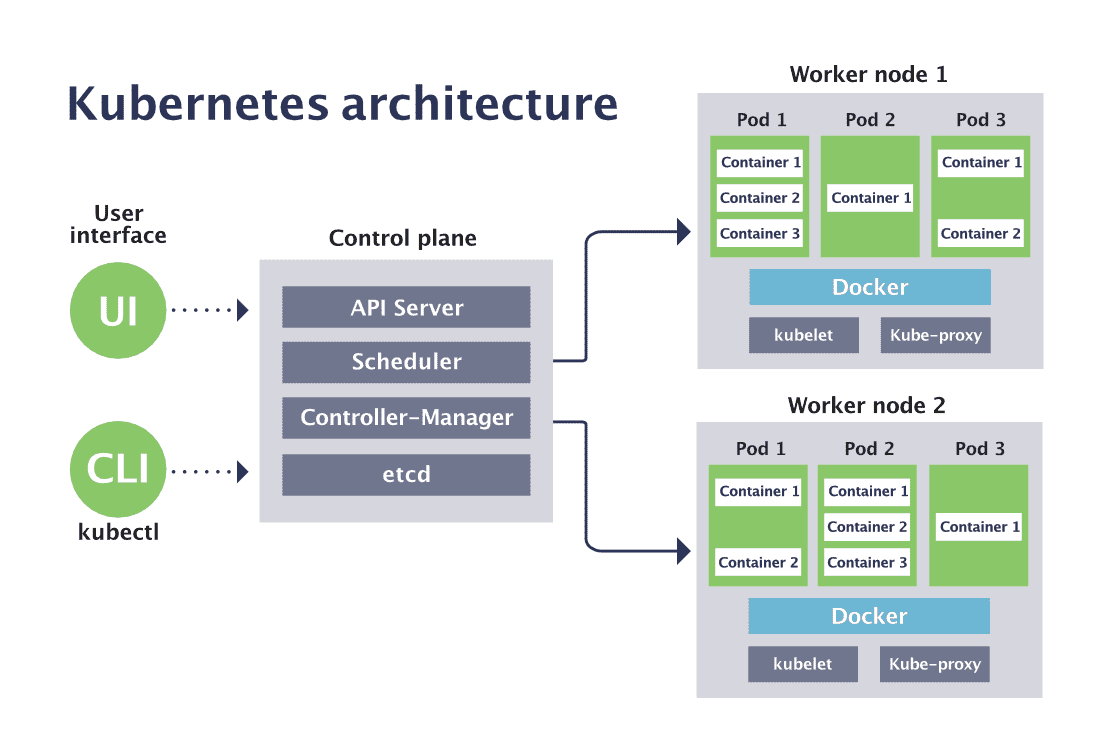
The above is the architecture of the Kubernetes cluster. It follows the master-slave architecture.
It has 2 main components:
1. Control Plane
2. Worker Nodes
Control Plane - It is the master node that controls all the resources that run inside the cluster. It makes global decisions about the cluster ie., whether to spin a new pod, detect which pod is down and delete it. It monitors all the events happening inside a cluster and detects the change in the state of a cluster. It has multiple components that control these events.
- etcd: It is a distributed key-value store for the cluster. This has information stored about the cluster at any given point in time.
You can find information about the object specifications, the status of each object, nodes on the cluster, which nodes have how many objects assigned, what services are exposed for which object, etc.
Manages - configuration data, meta data, cluster state data.
It is a very crucial database of the cluster and it is ideal to store this outside of the server where the master is running, as to give it more security. We can also say it is the backend of the cluster. - kube-schedular: It determines where our object is supposed to run, it checks for the objects that have not been assigned and look for a perfect node for it to assign.
- controller-manager: It is responsible to run the controller processes. It monitors the state of the cluster to see if the desired state that we requested is matching the cluster or not. It is the responsibility of this component to see if the cluster is stable and if all the resources are running or not.
- API Server: This component lets us interact with Kubernetes. what is the desired state that we wish Kubernetes to be at, all the commands are passed through this component. It acts as a front end of the control plane or the master node.
- pod: It is a group of one or more containers. All containers in a pod must have similar kind of configurations. They share the resources like storage and network. Each container in a pod can refer to other containers with localhost.
- kubelet: This is an agent that communicates with the master node or the control plane. It is responsible for running up the resources to run the workloads.
- kube-proxy: This is the networking component that exposes a pod to various services.
4. Features of Kubernetes
- It is declarative, you only need to specify the state you want your cluster in and it gets it done.
- It provides service discovery and load balancing utility as it exposes services and distributes the traffic if multiple instances are available.
- It can automatically mount storage and expand them according to requirements.
- It provides automatic rollouts and rollbacks.
- It also manages the secrets if your application requires one.
5. Difference between Docker Swarm and Kubernetes
- In the case of Docker Swarm, IP is associated with each container.
- In the case of a K8s, IP is associated with a pod, not containers.
6. What are the infrastructure requirements for Kubernetes?
- It requires 2 GB RAM and 2 core CPUs.7. What are namespaces?
- Namespaces are virtual clusters within the Kubernetes cluster.
- This helps to separate and organize objects in the k8s cluster, for example, you want to create different namespaces for development, test, and production environments.
- Not only it helps to organize objects, but it also helps to provide appropriate permissions with the help of role bindings and roles (we'll see it in later sections)
- kubectl create namespace [namespace-name]
- kubectl get ns --all-namespaces
8. Commands to work with namespaces?
- To see existing namespaces
$ kubectl get namespaces / $ kubectl get ns
- To check objects in a specific namespace
$ kubectl get <type of resource> --namespace <name>
$ kubectl get pod --namespace dev
- To create a namespace
$ kubectl create namespace <name>
$ kubectl create develop
- To get objects from all namespaces
$ kubectl get pods --all-namespaces
9. What is Kubectl?
- This is an official CLI for k8s to communicate with the Kubernetes cluster.
- Rest API is also used to perform this.
10. what is Kubeadm?
- This is used to build Kubernetes cluster configuration. It is basically used to setup the cluster. It is a utility.
11. what is Minikube?
- It is a developer's tool. This runs a Kubernetes cluster with one master and one node on a single machine.
- This is the reason it is called a developer's tool because it is widely used by developers to test applications in the development phase.
12. what are Helm and Helm Charts?
- Helm helps in managing the Kubernetes applications. It is a package manager for Kubernetes.
- It is used as a template and converts k8s objects into templates for reuse of these templates. These templates are called the Helm charts.
- They can easily create complex charts and templates. The directory structure looks like image below.
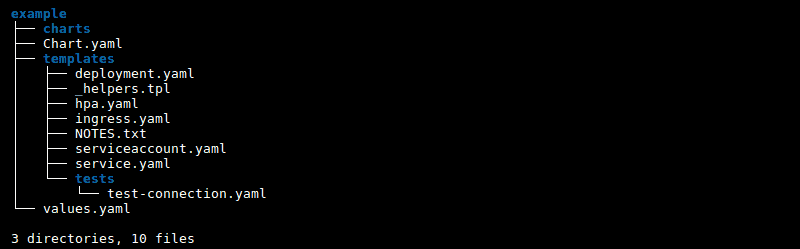
- We have a Chart.yml that describes the metadata of the chart.
- Templates is the directory where all your manifest files can be stored, also if you wish to call other charts from one chart, it is also possible.
- Values.yml file can be used to dynamically provide values to the manifests files stored.
- You can re-use a chart in different environments, like dev, test, and prod.
13. What is Kompose?
- This utility helps translate docker-compose files into k8s objects.
14. What is Kustomize?
- This is a similar utility to Helm. It also manages the configuration of the k8s cluster.
15. What are Kubectl common commands?
- Command for creating objects:$ kubectl apply -f <path-of-the-manifest-file> This command is used to create and modify the objects.
$ kubectl create -f <path-of-the-manifest-file> This command is used to create the objects only.
- Command to display objects
$ kubectl get pod/ $ kubectl get namespace / $ kubectl get service
- Command to get info about resources
$ kubectl describe pod / $ kubectl describe <object-type>
- Command to delete a resource
$ kubectl delete pod / $ kubectl delete service
- Command to execute commands inside a container
$ kubectl exec -it <pod-name> -- bin/bash
- If you have multiple containers in a pod
$ kubectl exec -it <pod-name> -c <container-name> command
16. What is Node Draining?
- This is a process that removes a node from the cluster. This is usually done when we want to update a particular node with some patches. Before doing this make sure no daemon set is running inside a node. A daemon set is those pods that are tightly coupled to a node, like, monitoring pods.
The command for node draining is -
$ kubectl drain <name-of-the-pod>
If you have some daemon sets running on the node then you can perform the below command-
$ kubectl drain <node-name> --ignore-daemonset
17. What is Uncordoning in Kubernetes?
- After draining, you wish to continue using the node again so that Kubernetes can schedule pods on the node.
- This process is called node uncordoning.
The command for uncordoning a node is-
$ kubectl un cordon <node-name>
18. How does Kubernetes manages the access in the cluster?
- Kubernetes uses RBAC (Role Based Access Control) strategy to provide access to the cluster.
- A admin is responsible for giving read/write access based on roles.
19. What are the inbuilt objects in Kubernetes for RBAC role access?
- We have 4 objects for providing access within the Kubernetes cluster:
Role - This is a role specific to a namespace. We have users in a cluster to whom we bind these roles. The role is limited to a namespace only.
apiVersion: rbac.authorization.k8s.io/v1
kind: Role
metadata:
  namespace: default
  name: role
rules:
- apiGroups: [""]
  resources: ["pods"]
  verbs: ["get", "watch", "list"]
RoleBinding - This is an object that binds the users and roles together.
apiVersion: rbac.authorization.k8s.io/v1kind: RoleBinding
metadata:
  name: RoleBinding
  namespace: dev
subjects:- kind: User
  name: jyoti # "name" is case sensitive
  apiGroup: rbac.authorization.k8s.io
roleRef:
  # "roleRef" specifies the binding to a Role / ClusterRole
  kind: Role #this must be Role or ClusterRole
  name: role-jyoti # this must match the name of the Role or ClusterRole you wish to bind to
  apiGroup: rbac.authorization.k8s.io
ClusterRoles - This role provides access on a cluster level.
apiVersion: rbac.authorization.k8s.io/v1
kind: ClusterRole
metadata:
   name: cluster-rolerules:
- apiGroups: [""]
  resources: ["secrets"]
  verbs: ["get", "watch", "list"]
ClusterRoleBinding - This is the same as RoleBinding but this gives access on a cluster level.
apiVersion: rbac.authorization.k8s.io/v1
# This cluster role binding allows anyone in the "manager" group to read secrets in any namespace.
kind: ClusterRoleBinding
metadata:
  name: read-secrets-global
subjects:
- kind: Group
  name: manager # Name is case sensitive
  apiGroup: rbac.authorization.k8s.io
roleRef:
  kind: ClusterRole
  name: secret-jyoti
  apiGroup: rbac.authorization.k8s.io
Note
Service Accounts:
- Used by container process to authenticate with k8s API.
20. What are configMaps in Kubernetes?
- Kubernetes allows passing configurations of an application to be passed dynamically rather than hard coding it inside an application.
- The values can be either passed by a configMap or a secret.
- ConfigMap is another object in Kubernetes that contains dynamic values (Non-Sensitive).
- We can map a single pod with multiple configMaps.
- This object stores the data in key-value pairs.
- It makes it easier to change and manage the app configuration data.
The commands to create a configMap:
$ kubectl create configmap <Name-of-the-configmap> --from-file <file-name>
You can also create a configmap by a manifest file as below:
apiVersion: v1
kind: ConfigMap
metadata:
  name: employeement
data:
  # property-like keys; each key maps to a simple value
  employee_no: "3"
  application_properties: "application.properties"

  # file-like keys
  game.properties: |
    enemy.types=aliens,monsters
    player.maximum-lives=5
  application.properties: |
    app.port=9088
    app.metadata=employementDetails
    springboot.health=true
21. What are the Secrets in Kubernetes?
- As with ConfigMaps, Secrets are also used to pass data dynamically into a pod.
- The difference here is, Secrets pass the data that contains a piece of sensitive information.
- While we create a secret, the data is encrypted.
The command to create a secret file:
$ kubectl create secret generic prod-db-secret --from-literal=username=produser --from-literal=password=abchdk
$ kubectl create secret generic db-user-pass \ --from-file=./username.txt \ --from-file=./password.txt
Intermediate level Questions
1. What is a resource request?
apiVersion: v1
kind: Pod
metadata:
  name: ui
spec:
  containers:
  - name: app
    image: jyotisingh/ui:latest
    resources:
      requests:
        memory: "64Mi"
        cpu: "250m"
2. What is a resource limit in Kubernetes?
apiVersion: v1
kind: Pod
metadata:
  name: ui
spec:
  containers:
  - name: app
    image: jyotisingh/ui:latest
    resources:
      limits:
        memory: "128Mi"
        cpu: "500m"
3. What are the Probes in k8s?
4. What is Liveness Probe?
apiVersion: v1
kind: Pod
metadata:
  labels:
    test: liveness
  name: liveness-probe
spec:
  containers:
  - name: liveness
    image: jyoti/ui:latest
    livenessProbe:
      exec:
        command:
        - cat
        - /tmp/healthy
      initialDelaySeconds: 5
periodSeconds: 5apiVersion: v1
kind: Pod
metadata:
labels:
test: liveness
name: liveness-http
spec:
containers:
- name: liveness
image: anyimage
args:
- /server
livenessProbe:
httpGet:
path: /healthz
port: 8080
httpHeaders:
- name: Custom-Header
value: Awesome
initialDelaySeconds: 3
periodSeconds: 35. what is Startup Probe in Kubernetes?
- Once the startup probe has succeeded, the liveness probe takes over to provide a fast response to container deadlocks.
- It has a similar syntax as the liveness probe.
startupProbe:
  httpGet:
    path: /healthz
    port: liveness-port
  failureThreshold: 30
  periodSeconds: 10
6. What is Readiness Probe?
- It manages the traffic acceptance status for our application. For example, there might be a frontend application that depends on the database application that has some startup time.
- No traffic will be sent to a pod until the container passes the Readiness Probe.
apiVersion: v1
kind: Pod
metadata:
  name: nginx
  labels:
    app: nginx
spec:
  containers:
  - name: goproxy
    image: an-image
    ports:
    - containerPort: 8080
    readinessProbe:
      tcpSocket:
        port: 8080
      initialDelaySeconds: 5
periodSeconds: 107. What are container restart policies?
- Whenever our container gives out some error code, the default policy occurs i.e., Always.- Sometimes we do not want this default policy to work, instead, we want to manage the container lifecycle on our own.
- We have restart policies to customize the behaviors of container restart according to our needs.
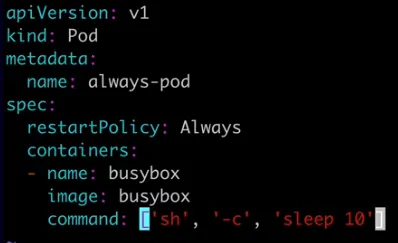
8. What is the Always restart policy?
- The main drawback of this policy is, that suppose we want some temporary jobs to be done with the help of a container, if we are not defining the correct restart policy then the container will always restart even if it is not needed.
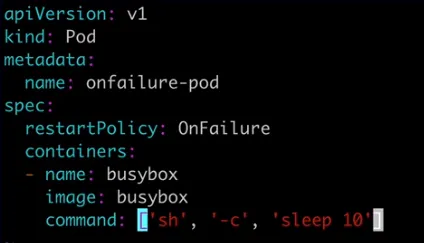
9. What is the On-Failure restart policy?
- We should use this for containers that need to run once successfully and then stops.
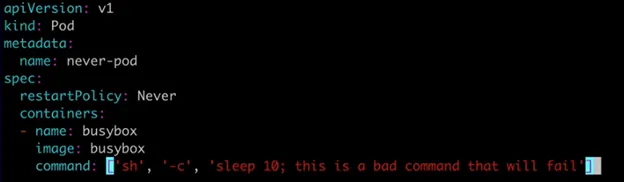
10. What is the Never Restart policy?
- This is a good choice for one-time executable containers.
11. What are Init Containers?
- This kind of container run before application containers.- They contain utilities or setup scripts that are not present in an application image.
- Multiple init containers can run in a manifest, and they run one after the other as defined in the order in the manifest file.
- The main application will only restart once all the Init containers are run successfully.
apiVersion: v1
kind: Pod
metadata:
  name: myapp-pod
  labels:
    app.kubernetes.io/name: MyApp
spec:
  containers:
  - name: myapp-container
    image: busybox:1.28
    command: ['sh', '-c', 'echo The app is running! && sleep 3600']
  initContainers:
  - name: init-myservice
    image: busybox:1.28
    command: ['sh', '-c', "until nslookup myservice.$(cat /var/run/secrets/kubernetes.io/serviceaccount/namespace).svc.cluster.local; do echo waiting for myservice; sleep 2; done"]
12. What are Bare Pods?
- A bare pod is a pod that does not have any replica set assigned.- These pods don't have any replication medium attached to them.
13. What is a ReplicaSet in Kubernetes?
- Replica set is used for managing the application scaling.- It ensures the number of pods we want to run at any point in time.
- ReplicaSet supports label selectors.
- In ReplicaSet we can also provide some conditional parameters as well, such as In, NotIn, or Exists.
14. What are Deployments in Kubernetes?
- This is a superset for ReplicaSet and Pod, which means it controls both.
- Smallest unit of Deployment is a pod. Each pod has its own IP Address & shares a PID namespace, network, and hostname.

15. What are storage classes?
apiVersion: storage.k8s.io/v1
kind: StorageClass
metadata:
  name: standard
provisioner: kubernetes.io/aws-ebs
parameters:
  type: gp2
reclaimPolicy: Retain
allowVolumeExpansion: true
mountOptions:
  - debug
volumeBindingMode: Immediate
16. What is a Persistent Volume claim in Kubernetes?
- It is similar to a pod and has similar attributes to a PV.
- Persistent Volume Claims looks for PVs to match criteria, if PV is not found it will automatically create a PV and bound to that.
apiVersion: v1
kind: PersistentVolumeClaim
metadata:
  name: foo-pvc
  namespace: foo
spec:
  storageClassName: "" # Empty string must be explicitly set otherwise default StorageClass will be set
  volumeName: foo-pv
17. What is a Persistent Volume (PV) in Kubernetes?
- Users set attributes to describe the underlying storage classes, which will be used to store data.
apiVersion: v1
kind: PersistentVolume
metadata:
  name: foo-pv
spec:
  storageClassName: ""
  claimRef:
    name: foo-pvc
    namespace: foo
18. What are Services in Kubernetes?
19. What is Service Routing?
- So, a service provides a Load balancer.
20. What are the types of Services available in Kubernetes?
- Service exposes our application to the external world. Different types of services are provided by Kubernetes to expose our application differently.- There are widely 5 types of services:
b. NodePort - exposes pod to the outside cluster but limited to a namespace
c. LoadBalancer - this requires a load balancer and exposes the pod to outside the cluster
d. ExternalName - it serves as a way to return an alias to an external service residing outside the cluster
e. Ingress - It works like a load balancer providing more functionality over it.
Advances Level Questions
1. How is scheduling if pods happen in Kubernetes and what factors affect it?
- The kube-schedular present on the master node is responsible for this process.
a. Attaching labels on the resources and when the pod is scheduled, it matched with the other resource labels it requests for.
2. What is a Node Selector?
- It uses labels to identify the nodes.
apiVersion: v1
kind: Pod
metadata:
  name: nginx
spec:
  containers:
  - name: nginx
    image: nginx
  nodeSelector:
disktype: ssd$ kubectl get nodes --show-labels
3. What is DaemonSet in Kubernetes?
apiVersion: apps/v1
kind: DaemonSet
metadata:
  name: fluentd-elasticsearch
  namespace: kube-system
  labels:
    k8s-app: fluentd-logging
spec:
  selector:
    matchLabels:
      name: fluentd-elasticsearch
  template:
    metadata:
      labels:
        name: fluentd-elasticsearch
    spec:
      containers:
      - name: fluentd-elasticsearch
        image: quay.io/fluentd_elasticsearch/fluentd:v2.5.2
4. What is Node Affinity in Kubernetes?
- As a node selector, it is used for pod allocation on worker nodes.
- With improvement on the node selector, conditions can also be passed with this.
a. RequireDuringScheduling
b. IgnoreDuringExecution
apiVersion: v1
kind: Pod
metadata:
  name: nginx
spec:
  affinity:
    nodeAffinity:
      requiredDuringSchedulingIgnoredDuringExecution:
        nodeSelectorTerms:
        - matchExpressions:
          - key: disktype
            operator: In
            values:
            - ssd
  containers:
  - name: nginx
image: nginxapiVersion: v1
kind: Pod
metadata:
name: nginx
spec:
affinity:
nodeAffinity:
preferredDuringSchedulingIgnoredDuringExecution:
- weight: 1
preference:
matchExpressions:
- key: disktype
operator: In
values:
- ssd
containers:
- name: nginx
image: nginx5. What is called as Scaling of pods in Kubernetes?
- We can do this with either Manual Intervention or we can automatically scale our cluster based on some metrics.
b. Horizontal Scaling - Adding more nodes, pods, etc.
6. What is a stateless application?
- These types of applications can be scaled up horizontally and new pods can be easily added.
7. What is a stateful application?
- The data that is saved is called stateful or applications state.
Please provide your valuable feedback, it will be considered really helpful.
For credits, I have taken images from Kubernete's official documentation site and medium site.

No comments:
Post a Comment